Use Metric Math in CloudWatch Alarm using AWS CloudFormation
Recently I had the following problem, a CloudWatch Alarm based on the Error-Metric of a critical Lambda Function occasionaly caused notifications.
The reason for the notifications was quickly found through a search in the lambda logs. The errors were caused by lambda timeouts. Since lambda timeouts are not critical in the utilised architecture I was looking for a way to ignore them in the CloudWatch Alarms.
The solution is called Metric Math.
Metric math enables you to query multiple CloudWatch metrics and use math expressions to create new time series based on these metrics.
Source: Using Metric Math by AWS
Herewith it is possible to create a new metric excluding the timeouts by subtracting timeouts from errors. By default there is no metric for timeouts within lambda functions. But this metric can be extracted with a simple Metric Filter applied to the loggroup of the respective lambda function:
MyLambdaFunctionTimeoutMetricFilter:
    Type: AWS::Logs::MetricFilter
    Properties:
        FilterPattern: 'Task timed out after'
        LogGroupName: !Ref MyLambdaFunctionLogGroup
        MetricTransformations:
            - MetricValue: "1"
            MetricNamespace: "MyLambdaFunction"
            MetricName: "Timeout"
Quelle: Gist auf GitHub
Then a CloudWatch Alarm can be created with a mathematical expression:
MyLambdaFunctionErrorsWithoutTimeoutAlarm:
    Type: AWS::CloudWatch::Alarm
    Properties:
        Metrics:
        - Expression: "m1-m2"
            Id: "e1"
            Label: ErrorsWithoutTimeout
            ReturnData: true
        - Id: "m1"
            Label: "LambdaFunctionErrors"
            MetricStat:
            Metric:
                Dimensions:
                - Name: FunctionName
                    Value: !Ref MyLambdaFunction
                MetricName: Errors
                Namespace: "AWS/Lambda"
            Period: 60
            Stat: Sum
            Unit: Count
            ReturnData: false
        - Id: "m2"
            Label: "LambdaFunctionTimeouts"
            MetricStat:
            Metric:
                MetricName: Timeout
                Namespace: "MyLambdaFunction"
            Period: 60
            Stat: Sum
            Unit: Count
            ReturnData: false
        EvaluationPeriods: 1
        Threshold: 0
        ComparisonOperator: GreaterThanThreshold
        AlarmActions:
        - Ref: MyTopic
Quelle: Gist auf GitHub
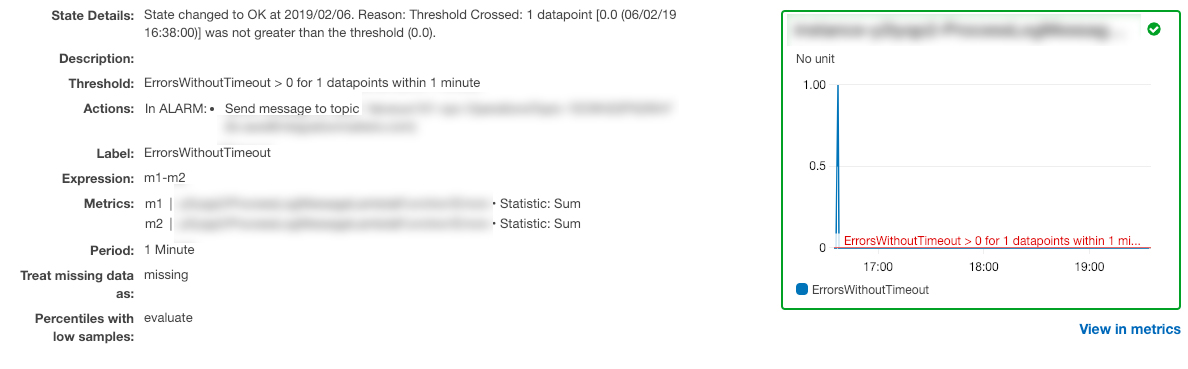
In the CloudWatch console the result of the template looks like this: